Play existent remixes

Make your own remix

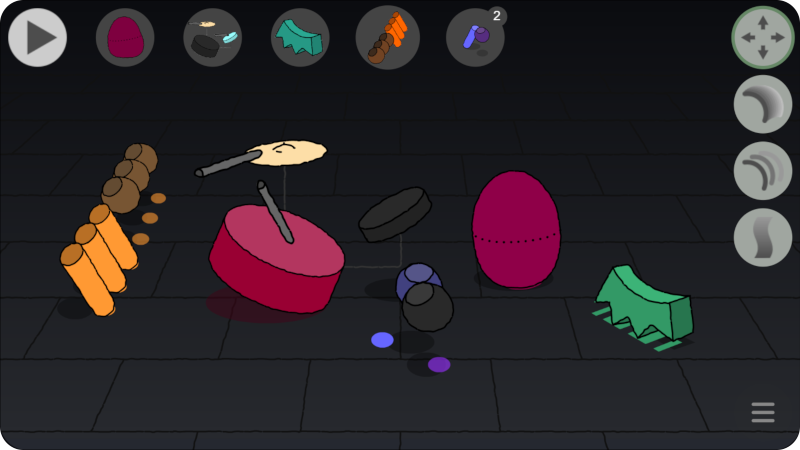
Press keyboard numbers (or click agent's buttons) to unmute/show the tracks that will sound initially. Also to later mute/hide them.

With the Move tool: Drag any agent to change its volume and stereo panoramic. Dragging up will move it more far, smaller and lower volume.

The other tools are effects: Choose the desired FX and click on agents to activate/deactivate the effect.

Click play when you are ready to start the remix session. You can later edit your actions (as keyframes in a timeline) before or after saving your remix.

If the audio or the animation sync is not fluid in your device, open the menu and the "low CPU" dropdown to tune it for less demand

Next

Do you want to save your Mix?

Artist: 

Preview Save Discard

Actual mix name:    ()

Save Cancel

Edit Keyframe:  -  Position:

Actions:

 <   >  Delete Kf Save Kf Close

Dubbing Artistic Recreative Technology:

Dub A.R.T.

Interactive Visual Music

“The Art of Remixing for everyone!”

A new music-video-game system, simply:

  • Drag moving agents to change pan and volume (move tool).
  • Use agent buttons (or keyboard numbers) to mute/unmute.
  • Use FX ‘weapons’ to put/remove effects (keys: r = reverb, d = delay, f = flanger).
  • Record your own Dub Version (or Remix) like playing a video-game!
  • Share your remix and get views and likes.
Not working fluid? Tune it for low CPU devices…

Effects:

Graphics:

Audio:

Tracks:

  • Full Up Riddim

    (music: Jamaican trad. / visuals: © Sebastià Freixa)

    Tracks/Agents: 5

  • Real Rock Riddim

    (music: Jamaican trad. / visuals: © Sebastià Freixa)

    Tracks/Agents: 5

  • TssTak Loop

    (music & visuals: © Sebastià Freixa)

    Tracks/Agents: 4